
Employee of the month video
A name on the big screen at the team meeting, or in the company channel. Type it, pick a reveal, add your logo.

Spotlight, playing live. Sample names are invented.
Templates that fit
Premium
Spotlight
Two beams sweep a dark stage and find the winner in gold.
 Premium
Golden Envelope
Awards night: a golden envelope opens and the winner’s card rises out.
 Premium
Marquee
Theatre bulbs chase around the sign, then every light hits the winner.
 Premium
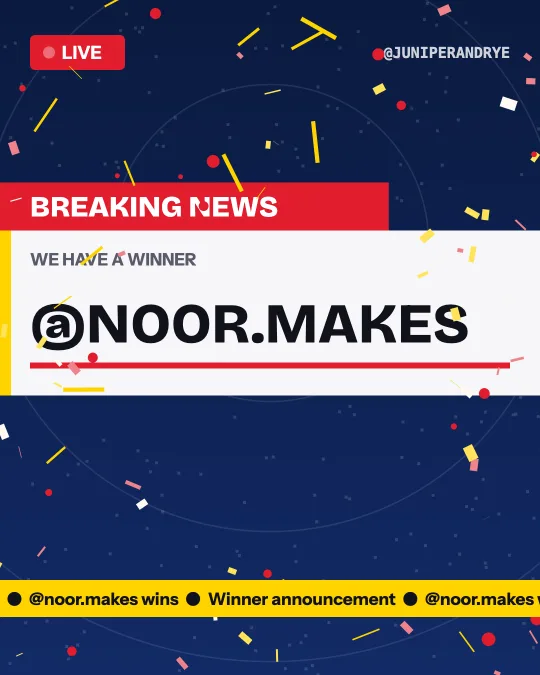
Breaking News
A live broadcast cuts in: “we have a winner”, with a rolling news ticker.
 Premium
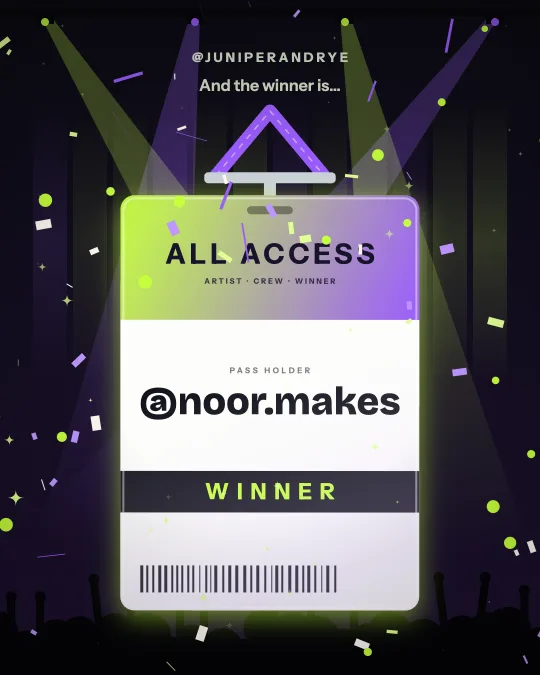
Backstage Pass
An all-access pass swings in on its lanyard, a stage light sweeps across and it flips to the winner.
 Premium
Fireworks
Rockets climb a night sky over a city skyline and burst as the winner’s name lights up.
How it works
Type who won
One name or @handle, or several (up to 200). The first five each get their own reveal.
Pick a template
Browse 50 styles by holiday, industry or look. Each one plays with your names as soon as you tap it.
Make it yours
Choose a color set or your own colors, add a logo, and pick 9:16, 4:5 or 1:1.
Download and post
Confetti Cannon and Classic Roll download free with a small winnerreveal.com credit. Every other template is $4.99 for that video, or included with WinnerReveal Pro.
Recognition that people watch
Most employee of the month announcements are a line in an email that half the team skims. A ten second reveal on the meeting-room screen gets the room looking at the same thing, builds a moment of suspense, and gives the person a real round of applause. It costs a minute to make.
It works for any recurring award: employee of the month, top seller of the quarter, safety award, customer hero, new starter of the month, team of the year. Type a team name as easily as a person's name.
A typed name, shown exactly as typed
Type "Priya Raman" and the video shows Priya Raman, with the capitals and spacing you used. There is no @ sign unless you type one. Names can be up to 60 characters, so "Marcus Bell from the warehouse team" fits on one line.
Nothing in the video says the name was drawn at random. It is an announcement, and that is how WinnerReveal labels it. If your award is drawn from a list of nominees, paste the nominees under Pick the winner for me and you get a draw with a record instead.
Several awards in one video
Type the names separated by commas. The first five each get their own reveal, in order, followed by a closing card. A monthly round-up of five awards becomes one video of about half a minute. Up to 200 names fit, but names after the fifth appear on the closing card only, so for a long list make one video per group of five.
Your company look
With the $4.99 unlock or WinnerReveal Pro, set the background, main and accent colors to your brand colors and add your logo at the top. The logo is read in your browser and never uploaded. If you announce every month, WinnerReveal Pro at $9 a month costs less than two single unlocks.
Spotlight, Golden Envelope, Marquee and Breaking News look like an awards show or a headline. They open first on this page.
Where to show it
For a meeting, open the studio on the presenting laptop and press Replay, or drop the downloaded file into your slides. For Slack, Teams or an intranet post, 1:1 or 4:5 plays well inline. For the company LinkedIn or Instagram, 4:5 or 9:16. Ask the person before you post their name publicly.
Every template comes in three shapes from the same design: 9:16 (1080 x 1920), 4:5 (1080 x 1350) and 1:1 (1080 x 1080). Pick the shape in the studio, download, then switch shape and download again if you post in more than one place.
Questions
Do I need a giveaway to use it?
No. Type any name and you get a video that announces it: a raffle winner, a contest winner, an employee of the month, a student of the week, a birthday name. The giveaway tools are there if you want them.
Can I use my brand colors and logo?
Yes. Every template has ready color sets; with the $4.99 unlock or WinnerReveal Pro you set the background, main and accent colors yourself and add a logo. The logo stays in your browser and is not uploaded.
When is the subscription worth it?
Two unlocked videos in a month cost $9.98, which is more than a month of WinnerReveal Pro at $9. One video a month: pay per video.
What sizes and formats do I get?
9:16 (1080 x 1920), 4:5 (1080 x 1350) and 1:1 (1080 x 1080). The file is MP4 where your browser can record MP4 and WebM otherwise. Videos are silent so you can add your own sound when you post.
Where is the video made?
In your browser. The animation is drawn on your screen and recorded there, then saved to your device. Keep the tab open until the recording finishes.